Posts

Showing posts with the label gitlab

SQL Joins

Image
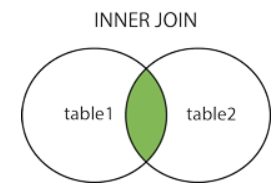
Joins are used to combine rows from two or more tables based on related columns between them. Joins allow you to retrieve data from multiple tables simultaneously, enabling you to create complex queries that fetch data from different sources. There are different types of joins in SQL, including: INNER JOIN Returns only the rows that have matching values in both tables based on the specified join condition. It discards non-matching rows from both tables. Example:           create table t1(x int); insert into t1 values(1); insert into t1 values(1); insert into t1 values(0); create table t2(y int); insert into t2 values(0); insert into t2 values(1); insert into t2 values(1);           select * from t1 inner join t2 on t1.x = t2.y Output: 2. LEFT JOIN (or) LEFT OUTER JOIN Returns all the rows from the left (or first) table and the matching rows from the rig...
Permission denied while connecting Amazon EC2 with GITLAB through SSH

Image
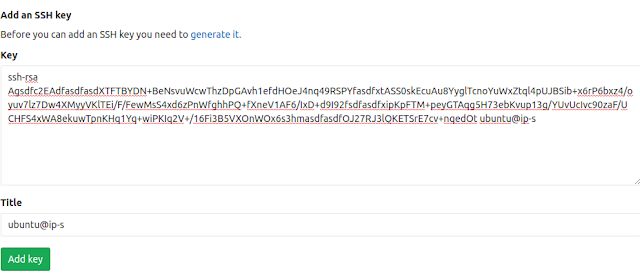
ubuntu@ip:~/folder$ git clone git@gitlab.com:name/repo.git Cloning into 'folder'... Permission denied (publickey). fatal: Could not read from remote repository. Please make sure you have the correct access rights and the repository exists. You are getting this error because EC2 instance have dosen't enough permission to access this git repo. You can solve this issue by adding the EC2 instance ssh key to gitlab. The following are the step to generate ssh in EC2 and add that to gitlab, ubuntu@ip-:~$ ssh-keygen Generating public/private rsa key pair. Enter file in which to save the key (/home/ubuntu/.ssh/id_rsa):  Enter passphrase (empty for no passphrase):  Enter same passphrase again:  Your identification has been saved in /home/ubuntu/.ssh/id_rsa. Your public key has been saved in /home/ubuntu/.ssh/id_rsa.pub. The key fingerprint is: SHA256:/f+sdfsdfasdfxHdfa7uliBQviGGidshezsLI ubuntu@ip The key's randomart image is: +---[RSA 204...