Posts

Showing posts with the label postgres

SQL Joins

Image
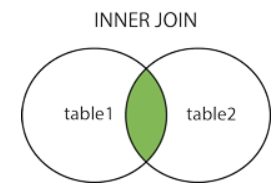
Joins are used to combine rows from two or more tables based on related columns between them. Joins allow you to retrieve data from multiple tables simultaneously, enabling you to create complex queries that fetch data from different sources. There are different types of joins in SQL, including: INNER JOIN Returns only the rows that have matching values in both tables based on the specified join condition. It discards non-matching rows from both tables. Example:           create table t1(x int); insert into t1 values(1); insert into t1 values(1); insert into t1 values(0); create table t2(y int); insert into t2 values(0); insert into t2 values(1); insert into t2 values(1);           select * from t1 inner join t2 on t1.x = t2.y Output: 2. LEFT JOIN (or) LEFT OUTER JOIN Returns all the rows from the left (or first) table and the matching rows from the rig...

Automate failover in postgres replication using repmgr

repmgr.conf =========== failover=automatic pg_bindir='/usr/lib/postgresql/9.5/bin' promote_command='repmgr standby promote -f /etc/repmgr/repmgr.conf' follow_command='repmgr standby follow -f /etc/repmgr/repmgr.conf' note pg_bindir property otherwise you will pg_ctl unknown command error postgrsql.conf ============== shared_preload_libraries = 'repmgr_funcs' repmgrd helps to monitor the replication , with -d/--daemonize option you can run this as a deamon process Run the following command in standby server 1 & 2 alone , create a log file as postgres user otherwise you will get permission issue > sudo su - postgres > vi repmgr.log > repmgrd -f /etc/repmgr/repmgr.conf --verbose > repmgr.log 2>&1 repmgr=# select * from repmgr_cluster.repl_nodes order by id;  id |  type   | upstream_node_id | cluster | name  |                   conninfo             ...

Postgresql Master Slave Replication Setup using repmgr with EC2 instances

repmgr is an open source tool which helps to implment & monitor postgres replication and also helps in manageing the switchover and automatic failovers. Here we are going to implement one master and two standby servers streaming replication with repmgr. Master (127.0.0.1) Standby1 (127.0.0.2) Standby2 (127.0.0.3) Install Postgresql in all the 3 instances and enable passwordless connection between the instances using ssh. #Remove all the postgresql leftovers from the system sudo apt-get --purge remove postgresql-* sudo rm -Rf /etc/postgresql /var/lib/postgresql #Install Postgress & repmgr sudo apt-get update sudo apt-get install postgresql postgresql-contrib sudo apt-get install postgresql-9.5-repmgr sudo service postgresql stop Edit postgresql.conf and pg_hba.conf files in all the 3 instances with the respective following changes, so that in future standby act as master with minimal changes. > sudo su - postgres > cd /etc/postgresql/9.5/main/ ...

Postgresql Master/Slave Steaming Replication with Docker Container in Ubuntu 14

Install docker Download Official Postgresql docker image from   https://hub.docker.com/_/postgres/ > docker pull postgres Create folder docker_postgres and create a new file docker-compose.yml and paste the below information in it. my-docker:  image: postgres Run the following command to create two docker containers with the name master and slave. > docker run -d --name master postgres > docker run -d --name slave postgres To list the running docker containers > sudo docker ps -a To connect the running docker container. > docker exec -ti master bash Execute the following commands in both master and slave containers Set the password for postgres user > passwd postgres Install openssh and vim > apt-get update > apt-get install openssh-server > service ssh start > apt-get install vim To set default language locale > dpkg-reconfigure locales Locales to be generated: 146 Default local...