Posts

Showing posts with the label sql

SQL Joins

Image
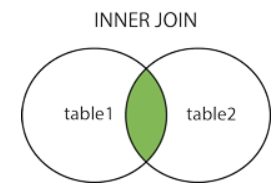
Joins are used to combine rows from two or more tables based on related columns between them. Joins allow you to retrieve data from multiple tables simultaneously, enabling you to create complex queries that fetch data from different sources. There are different types of joins in SQL, including: INNER JOIN Returns only the rows that have matching values in both tables based on the specified join condition. It discards non-matching rows from both tables. Example:           create table t1(x int); insert into t1 values(1); insert into t1 values(1); insert into t1 values(0); create table t2(y int); insert into t2 values(0); insert into t2 values(1); insert into t2 values(1);           select * from t1 inner join t2 on t1.x = t2.y Output: 2. LEFT JOIN (or) LEFT OUTER JOIN Returns all the rows from the left (or first) table and the matching rows from the rig...

SQL Joins

Image
Joins are used to combine rows from two or more tables based on related columns between them. Joins allow you to retrieve data from multiple tables simultaneously, enabling you to create complex queries that fetch data from different sources. There are different types of joins in SQL, including: INNER JOIN Returns only the rows that have matching values in both tables based on the specified join condition. It discards non-matching rows from both tables. Example:           create table t1(x int); insert into t1 values(1); insert into t1 values(1); insert into t1 values(0); create table t2(y int); insert into t2 values(0); insert into t2 values(1); insert into t2 values(1);           select * from t1 inner join t2 on t1.x = t2.y Output: 2. LEFT JOIN (or) LEFT OUTER JOIN Returns all the rows from the left (or first) table and the matching rows from the rig...

SQL Access WebApi with Basic Authentication

exec CALLWEBSERVICE 'username','password' CREATE PROCEDURE CALLWEBSERVICE(@Username NVARCHAR(50), @Password NVARCHAR(50)) AS     BEGIN     Declare @Object as Int;     DECLARE @authHeader VARCHAR(8000);        DECLARE @contentType VARCHAR(8000);     DECLARE @postData NVARCHAR(4000);     Declare @json as table(response nvarchar(max))     SET @postData = '{"method":"GetUserVehicles","userid":"1323","companyid":"0"}';        SET @contentType = 'application/json';     SET @authHeader = @Username + ':' + @Password;         SELECT         @authHeader = 'BASIC ' + CAST(N'' AS XML).value(               'xs:base64Binary(xs:hexBinary(sql:column("bin")))'             , 'VARCHAR(MAX)'...

Generate Create and Insert script with data in sql

Image
Right click on the existing database and choose Tasks → Generate Scripts Select the database objects to script Go to Set Scripting Options and Specify how scripts should be saved or published Choose Output type .. Save script to a specific location and click on the Advance button In the General tab go to Types of data to script and Select the appropriate option and click on OK . It will generate the CREATE TABLE statement and all of the INSERT statements for the selected data